End an employee's employment
Taking someone off the payroll is called removing them, and E·BIZI Pay asks you a question first: whether they are gone for good or just not being paid this month. The two do very different things.
Remove someone
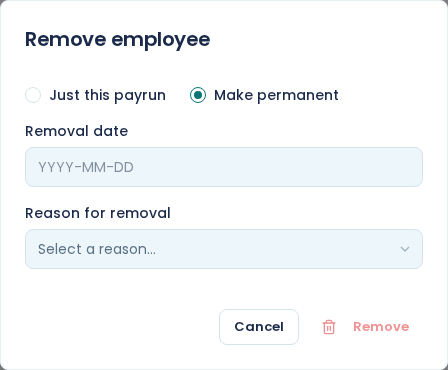
Open the person from the Employees list and choose Remove at the top right. That opens Remove employee.
Pick Just this payrun or Make permanent, give a Reason for removal, then choose Remove.
Just this payrun
Use this when someone is still employed but should not be paid this month. Unpaid leave is the usual case.
They come off the open month immediately, and their figures come out of the totals with them. The reasons offered are the ones that mean someone is still working for you, so Medical Leave and Maternity/Adoption Paid are on the list and Resigned is not.
They come back automatically. When you confirm the month, everyone removed for that single run returns to the new one, on the same salary. You do not have to remember to restore them, and there is nothing to undo.
They stay under Current employees the whole time, because they have not left.
Make permanent
Use this when the employment has actually ended.
Removal date appears and is required. It is their last day, and it cannot be earlier than the first day of the open month. If it falls inside the open month, E·BIZI Pay recalculates that person straight away so the month pays them up to that date and no further.
The reasons here are the ones that end an employment: Resigned, Dismissed, Contract End, Retrenched, Retired and the rest. Pick the one that is true, because it is what prints on their certificate of service and what goes to the Department of Labour on the UIF declaration.
They drop out of the payroll for good. The next month you confirm will not include them.
Where they go
Permanently removed people are not deleted. They move to the archive.
On the Employees list, switch the dropdown at the top right from Current employees to Archived employees and they are there. Everything they were paid stays on their record, and on the confirmed months they were part of.
Give them a certificate of service
Open an archived employee and the buttons at the top change to Download certificate and Send certificate.
Download certificate puts the certificate of service in your downloads. Send certificate emails it to them, after a confirmation dialog naming them.
E·BIZI Pay fills it in from their record: their position, what they were paid and how often, their start date, their last day, and the reason you chose. Your company details and the authorised person come off your company profile, so check those are right before you send one. See company details and payslip branding.
Every employer in South Africa owes a departing employee this certificate. For what has to be on it, see final pay.
Their last month still has to be finished
Removing someone does not close anything. Their final month runs through the same steps as any other: confirm it, pay them, send the payslip, do the SARS work. See the Processing dashboard.
They also still belong on the UIF declaration for the month they left. See the UIF declaration and certificate of service.