An employee's payroll history
Every employee's page carries their own run of confirmed months, so you can answer "what did we pay her in October" without opening October.
Find it
Open the person from the Employees list. Payroll history is the table below their details.
You have to be signed in to see it. It is not part of the trial.
What each row is
One confirmed month for this person, most recent first.
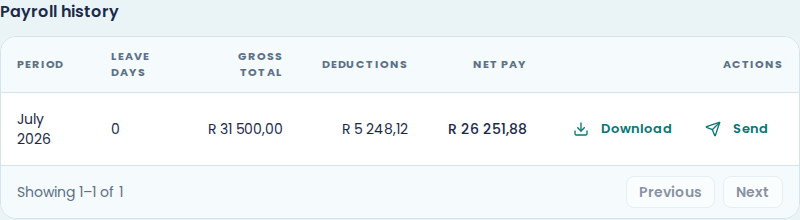
Period is the month. Leave days is what they took in it. Gross total, Deductions and Net pay are their three figures for that month, the same ones the payroll row showed at the time.
Only confirmed months appear. The month you have open now is on the Payroll screen, not here, because its figures can still move.
Get a payslip out of it
Each row has Download and Send.
Download gives you that person's payslip for that month as a PDF. Send delivers it on their preferred channel, after a confirmation dialog naming them. Both work on months you closed long ago, so this is the quickest way to answer "can you resend my March payslip".
See view and download payslips and send payslips to employees.
An empty table
A new employee reads "No payroll history yet". They will appear here after you confirm their first month.
This is not the Payroll history section
Two things share the name and they answer different questions.
This table is one person, every month. The Payroll history section at the foot of the Payroll screen is one month, every person, with the company totals for it. Use that one when you want to know what a month cost. See payroll history.