The EMP201
The EMP201 is the monthly return telling SARS what you owe in PAYE, UIF and SDL. E·BIZI Pay works out the figures and shows you the return. You submit it on eFiling yourself.
For what the return is and when SARS wants it, see EMP201 explained.
Generate the EMP201
On the Processing dashboard, pick the month you are reporting on, then choose Mark complete on Generate EMP201.
The report opens, and the step completes at the same time. You are not ticking a box and then going to find the numbers somewhere else.
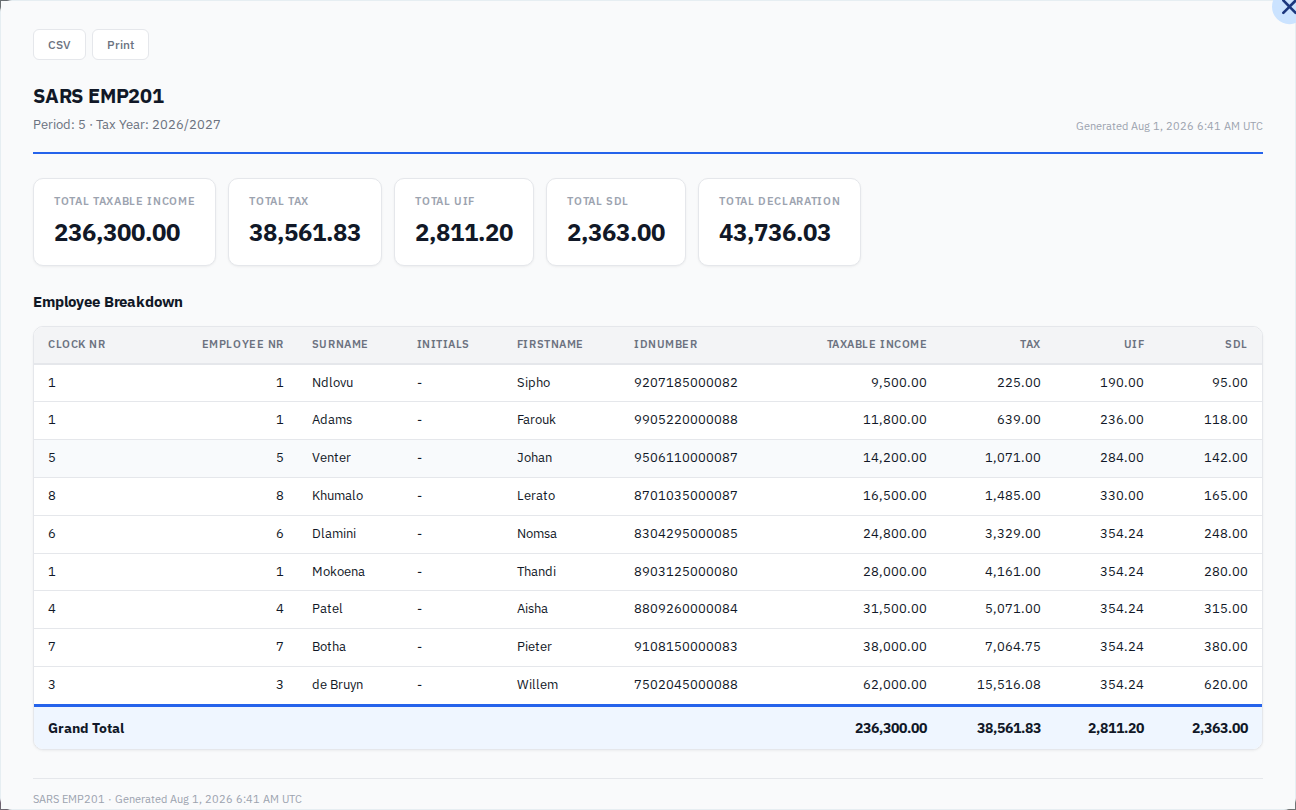
Reading the report
Five figures across the top. Total taxable income is what you paid everyone. Total tax is PAYE. Total UIF is both halves, the employees' and yours. Total SDL is yours.
Total declaration is the sum of tax, UIF and SDL, and it is the amount that has to reach SARS. In the example above that is 38,561.83 plus 2,811.20 plus 2,363.00, which is 43,736.03.
Underneath, every employee on the run with their ID number and their share of each figure, and a grand total that matches the tiles.
Get the numbers out
CSV downloads the report. Print opens your browser's print dialog, which is also how you get a PDF.
Neither of these submits anything. Copy the figures onto your EMP201 on eFiling.
Before it will work
Generate EMP201 needs three things, and the card does nothing when one is missing.
Every employee on the run needs a tax number. The company needs its SARS income tax reference, and if you are a CC or a Pty Ltd, its registration number. Both live in your company details, and anything absent is named in a warning above the workflow cards with a link to fix it.
The step also sits behind Capture Accounting Entries, so the two accounting steps have to be done first. A card showing blocked is waiting for the step before it, not for a date.
The two steps after it
Submit EMP201 and EMP201 Payment are yours to confirm. E·BIZI Pay cannot see eFiling and it cannot see your bank, so marking them complete is you recording that you did it. Nothing leaves E·BIZI when you do.
Doing it again
Completed, Generate EMP201 offers Re-execute, which reopens the report. Use it when you want the numbers again, or a fresh CSV. It does not change anything.