The Processing dashboard
Processing is the month-end checklist. It shows what has to happen after a payroll is confirmed, in order, with the dates each thing is due.
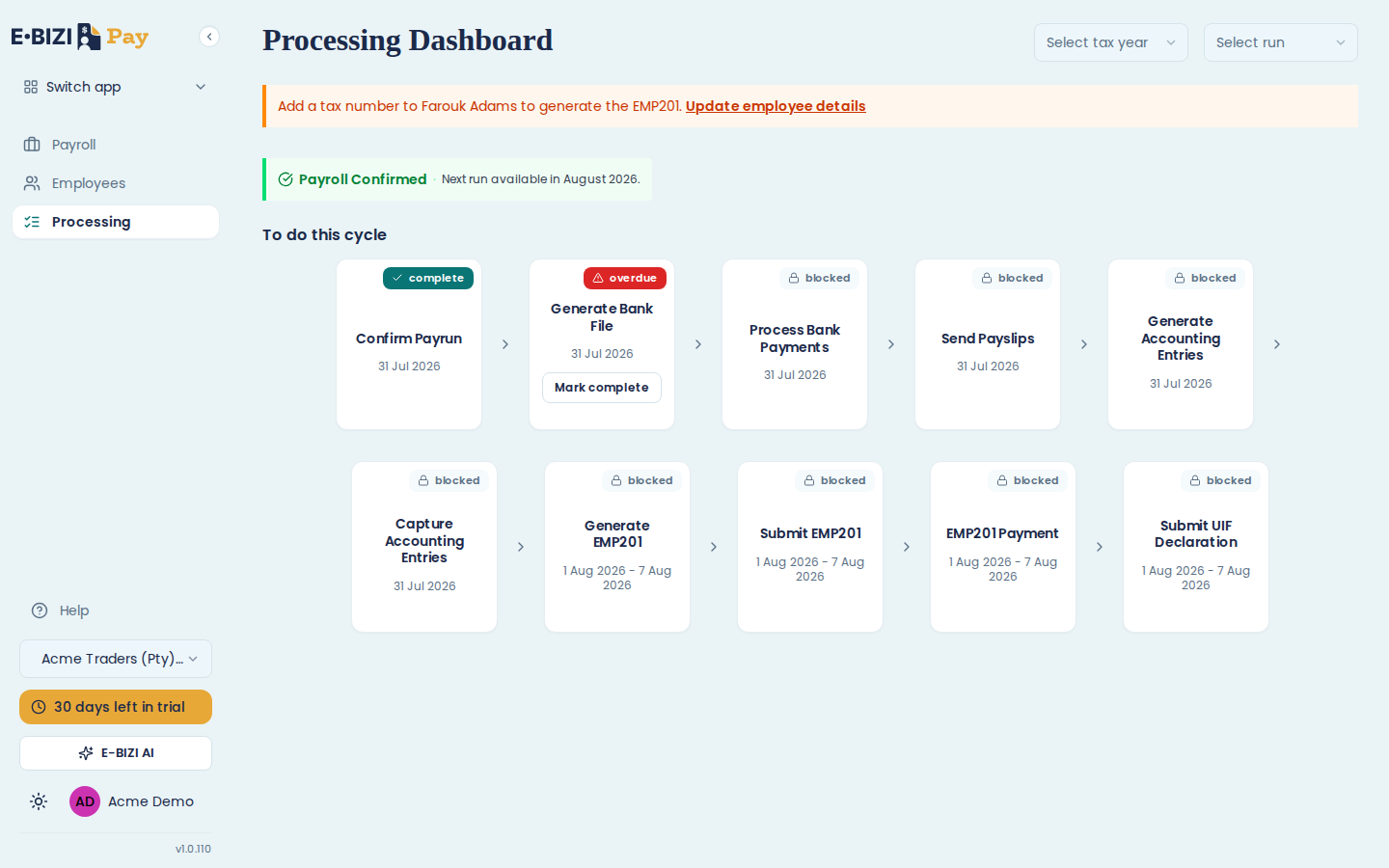
Reading the cards
Each card is one step, with a date and one of four states.
complete is done.
due is ready for you, and not late yet.
overdue is also ready for you, and past its date. It is the same thing as due with a deadline behind it.
blocked is waiting for the step before it. Only that. A blocked card has nothing to do with the date on it, so a step dated next week can be worked on today, and a step dated last month stays blocked until its predecessor is done.
Anything actionable carries a Mark complete button. More than one card can be actionable at a time, so the order is a guide rather than a rail.
Redoing a step
Some completed cards offer Re-execute and some do not, and the split is not arbitrary: the steps that produce something can be redone, and the steps where you are recording that something happened cannot.
Generate Bank File, Send Payslips, Generate Accounting Entries, Generate EMP201 and Submit UIF Declaration all make a file, an email or a report, so all five can be re-run. Confirm Payrun, Process Bank Payments, Capture Accounting Entries, Submit EMP201 and EMP201 Payment cannot: there is nothing to remake, and the first of them is not reversible anyway.
The steps
In the order they appear: Confirm Payrun, Generate Bank File, Process Bank Payments, Send Payslips, Generate Accounting Entries, Capture Accounting Entries, Generate EMP201, Submit EMP201, EMP201 Payment, and Submit UIF Declaration.
The first six are dated the last day of the month. The EMP201 and UIF steps are dated 1 to 7 of the following month, because that is SARS's deadline. The date tells you when the work is due. It does not gate the card.
What finished looks like
All ten complete, which is the month closed off entirely.
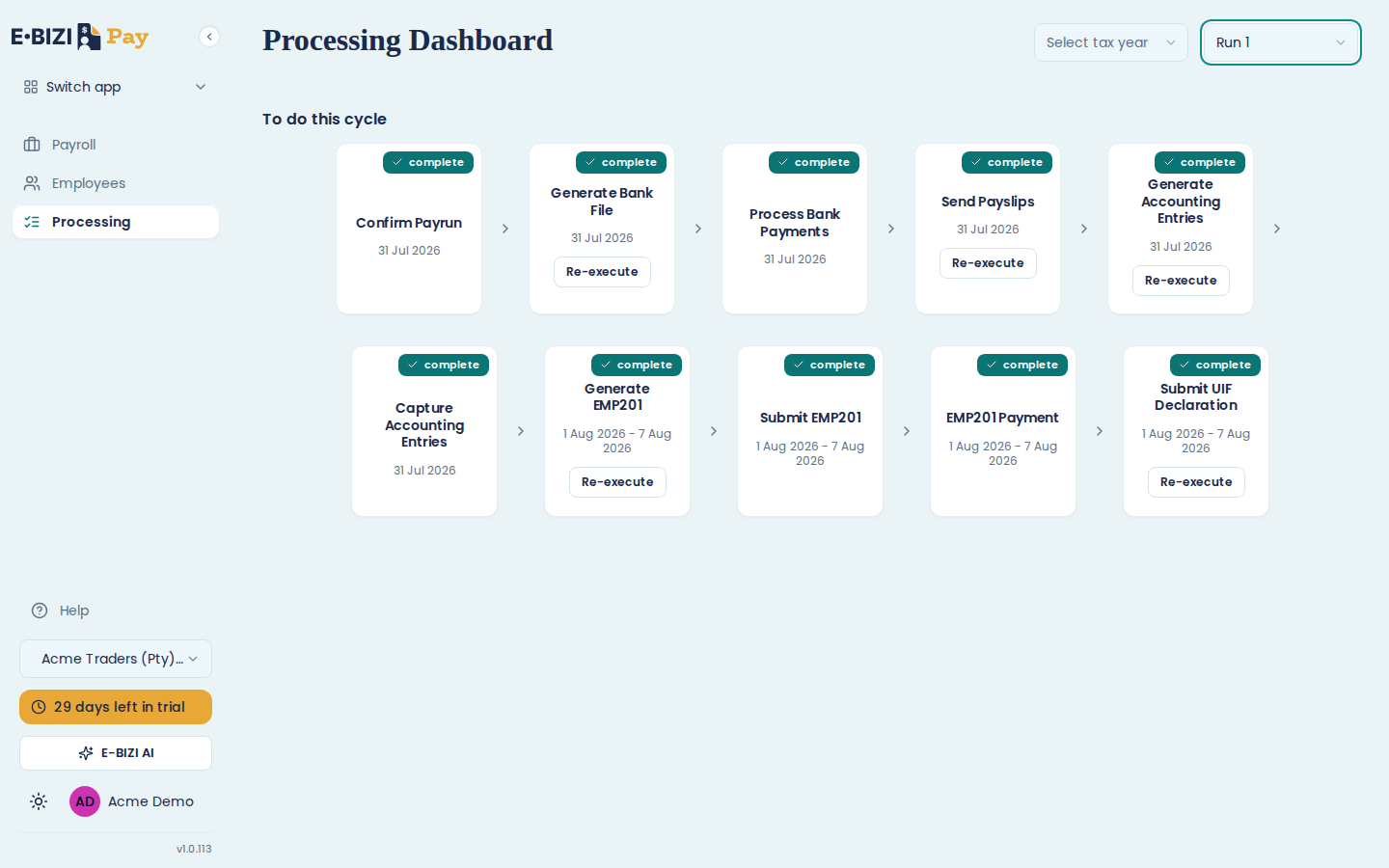
Once a month has nothing outstanding, the dashboard stops opening on it and moves to the next one that does. Use Select run to come back to it.
Mark complete does real work
For most steps this is not a tick-box. Generate Bank File asks for a format and a payment date and produces a file. Send Payslips asks you to confirm and then emails everyone. The step completes because the work happened, not because you clicked.
A few steps genuinely are you telling E·BIZI Pay something happened outside it. Process Bank Payments is one: E·BIZI Pay cannot see your bank, so marking it complete is your confirmation. See record that your people were paid.
The two accounting steps split the same way. Generate Accounting Entries opens a report; Capture Accounting Entries records that you put it in your books. See accounting entries.
Warnings at the top
Anything that will block a step appears above the cards, naming the employee and the consequence, with a link to fix it. A missing tax number, for example, reads "Add a tax number to Farouk Adams to generate the EMP201" with an Update employee details link.
Fix those before you reach the step they affect. Generate EMP201 does nothing at all when a tax number is missing, and it does not tell you why at the time. See the EMP201.
Picking a different month
Select tax year and Select run at the top right move you between periods, which is how you check what happened in a month you have already finished. Runs are numbered in the order they ran, starting at Run 1 for your first month on E·BIZI Pay, and they keep counting up across tax years rather than restarting each March.
What the submissions are for
E·BIZI Pay produces the EMP201 for you to submit at SARS yourself, and it sends the UIF declaration to the Department of Labour on your behalf. See the EMP201 and the UIF declaration and certificate of service.
For what each one is and when it is due, see EMP201 explained and UIF explained.