The payroll screen
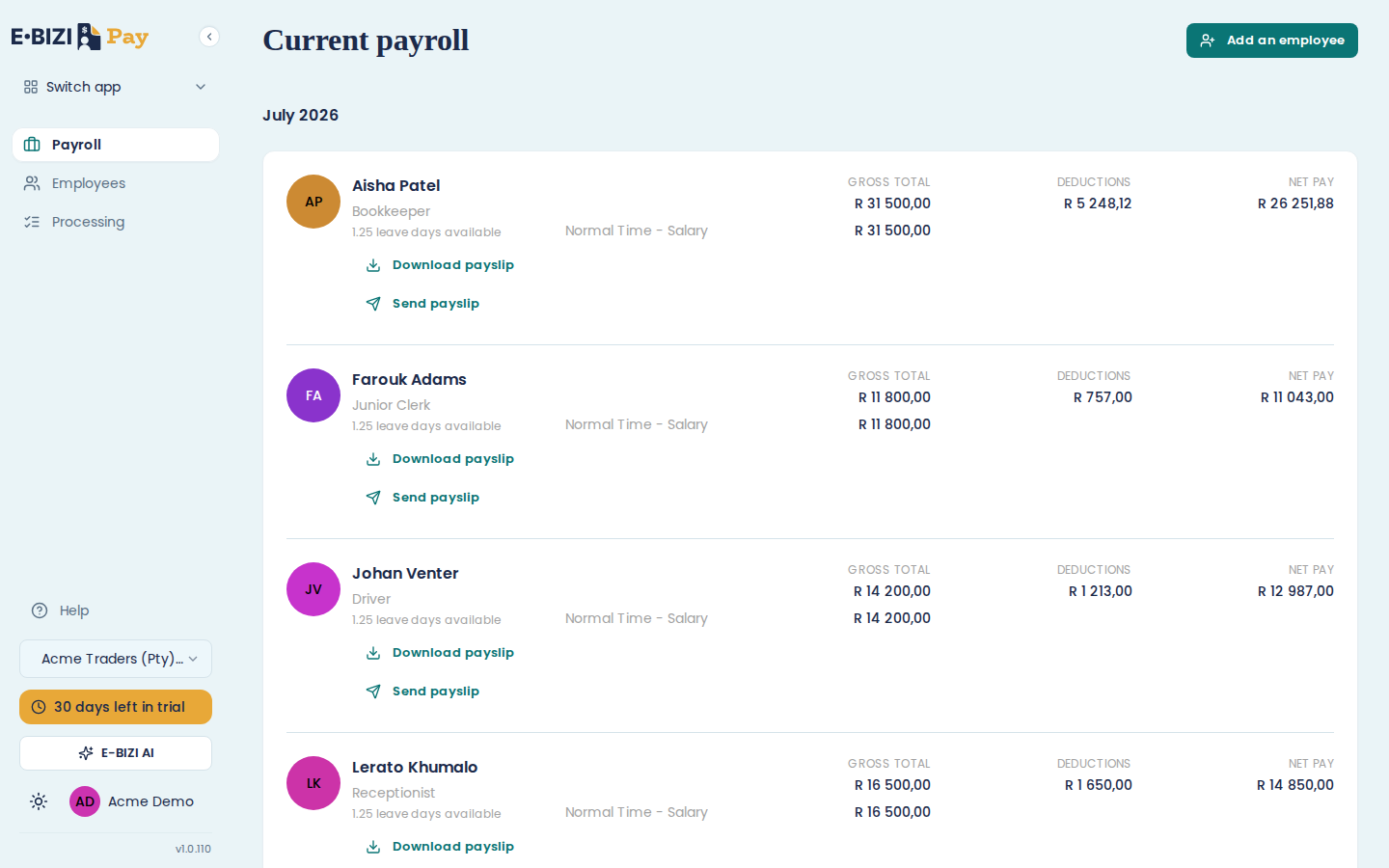
This is where every month starts and finishes. The period you are working in is named at the top under Current payroll, and each employee is a row.
Reading a row
Open a row and you get that person's figures for the month:
- GROSS TOTAL, and the lines that make it up, usually a single salary line
- DEDUCTIONS, which is PAYE and UIF, plus anything else you have set up
- NET PAY, which is what actually reaches their account
The leave line tells you how much leave they have accrued so far. A new employee on their first month shows a small number, because leave builds up as they work.
What you can do from a row
While the month is open: Add income to put a bonus, commission or other payment on top of the salary, and Add leave to record time off.
Download payslip gives you a PDF of that person's payslip.
Once you have confirmed the month, Add income and Add leave go away and Send payslip appears. See close a payroll period.
Warnings
If something will stop you finishing the month, E·BIZI Pay tells you rather than letting you find out at submission time. A missing tax number, for instance, shows as a message naming the employee and what it blocks, with a link to fix it.
Those warnings also appear on the Processing dashboard, which is where they matter most.
Adding someone mid-month
Choose Add an employee at the top. They join the current month, and their pay is worked out from their start date rather than the whole month, so joining on the 15th does not pay them for the 1st.