Change an employee's pay
A raise and a one-off adjustment are different jobs in E·BIZI Pay, and picking the wrong one is the easiest mistake to make here. A raise changes the employee's record. A one-off changes this month and nothing else.
Give someone a raise
Open the person from the Employees list, choose the edit pencil, and change the gross amount under Employment. Choose Save.
That is their salary from now on. The open month picks it up straight away, and every month after it uses the new figure.
A month you have already confirmed keeps the old one. Confirmed figures are locked, so a raise you enter in August does not reach back into July. See close a payroll period.
Change the pay for one month only
Do this on the Payroll screen, not the employee.
Open the person's row. Next to the Normal Time - Salary line there is a pencil. Choose it and Edit gross salary opens.
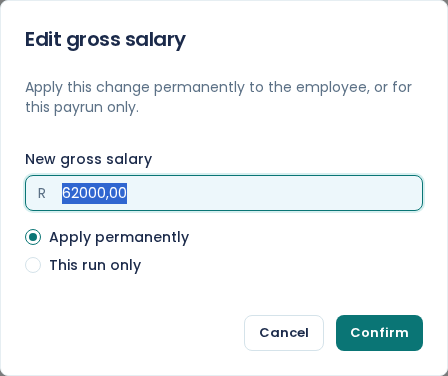
Enter the New gross salary, pick This run only, and choose Confirm. The row recalculates immediately: gross, deductions and net pay all move, and so do the company totals at the foot of the screen.
Their record is untouched. Next month they are back on their normal salary.
The dialog defaults to permanent
Edit gross salary opens on Apply permanently, not This run only. Leave it there and it does the same thing as editing the employee: the salary changes for good.
So the radio button is the whole decision, and it is the part that is easy to click past. If you meant "just this month", choose This run only before you confirm.
Which one to use
Use a raise for anything that carries on: a salary increase, a promotion, a corrected salary that was wrong from the start.
Use This run only when the person's normal salary is right and this month is not: a short month for someone who joined or left partway through, a temporary rate while they act in another role, an agreed reduction for one month.
Paying something extra is a third thing
A bonus, commission or an allowance is not a change of pay. Add it as its own line with Add income on the row, which keeps it separate from salary on the payslip and taxes it on its own terms. See earnings and deductions.
Changing the gross for one month buries the extra inside the salary figure, so it is the wrong tool for a bonus even though the total comes out the same.
Only while the month is open
Both the pencil and Add income disappear once you confirm the month, because the figures they change are fixed by then.
The employee's record can still be edited after you confirm. The change lands in the next month rather than the one you closed.