Accounting entries
Payroll has to end up in your books: the wage bill as a cost, the PAYE and UIF you owe as liabilities, the net pay as money leaving the bank. E·BIZI Pay works out those entries and shows them to you. Putting them into your books is your side of it.
Generate the entries
On the Processing dashboard, pick the month and choose Mark complete on Generate Accounting Entries.
The general ledger report opens, and the step completes at the same time. You are not ticking a box and then hunting for the numbers somewhere else.
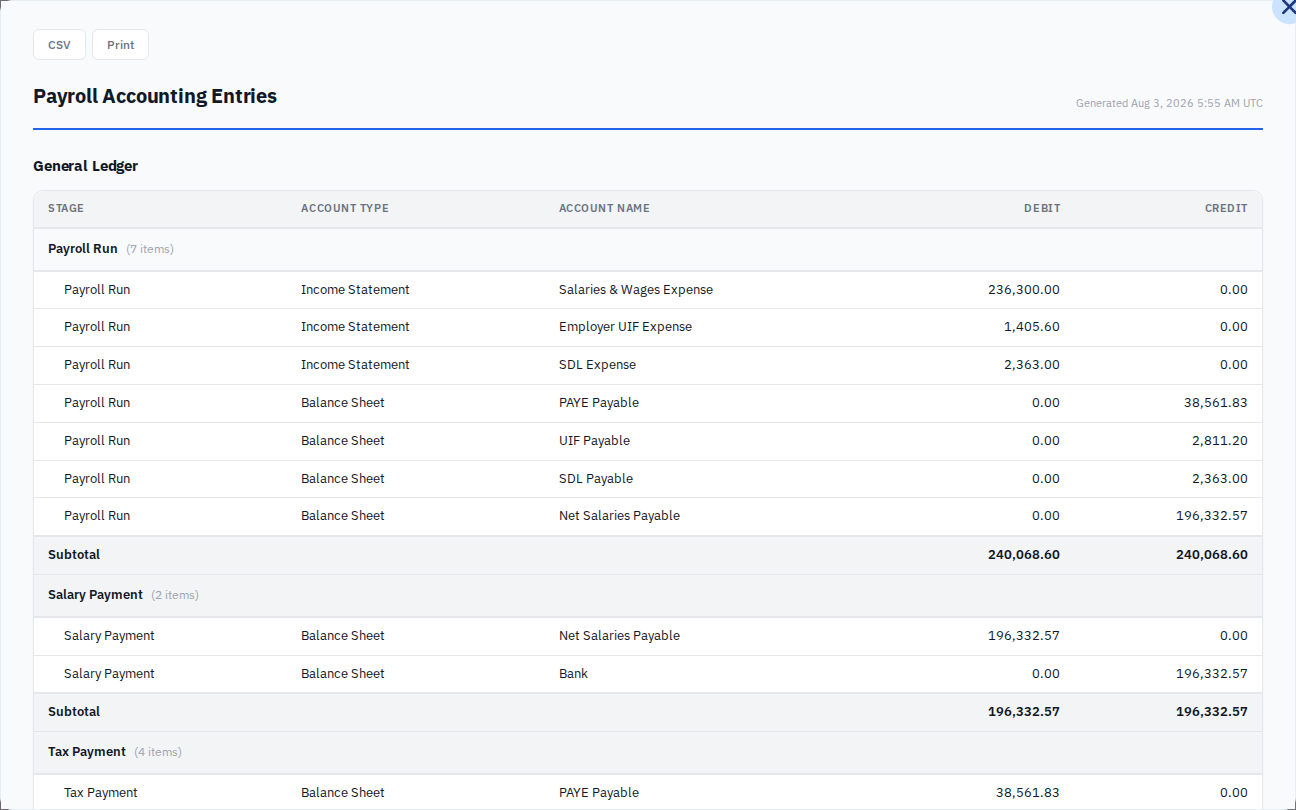
Reading the report
It is three journals rather than one, listed under Stage.
Payroll Run is the payroll itself. Your costs are debited: Salaries & Wages Expense for the whole gross, Employer UIF Expense and SDL Expense for your own contributions. What you now owe is credited: PAYE Payable, UIF Payable, SDL Payable, and Net Salaries Payable for the wages themselves.
Salary Payment clears the wages. It debits Net Salaries Payable and credits Bank, which is the money leaving your account.
Tax Payment clears what SARS is owed the same way, debiting the three payable accounts and crediting Bank for the total.
Each stage carries a Subtotal where its debits and credits match, and every line names its Account Type as Income Statement or Balance Sheet so you can see which are costs and which are balances.
The Grand Total at the foot adds all three journals together, so it is roughly double the month's payroll. That is arithmetic, not an error: the same liability appears once when it is raised and once when it is paid.
Get the report out
CSV downloads it. Print opens your browser's print dialog, which is also how you get a PDF.
Take whichever your bookkeeping suits. A CSV is easier if you are keying a journal in from it or importing it; a PDF is easier if you are emailing it to whoever does your books.
Capture them in your books
Enter the journal wherever you keep your accounts, then come back and choose Mark complete on Capture Accounting Entries.
That second card does nothing except record that you did it. E·BIZI Pay cannot see your accounting system, so there is no import, no connection to configure, and nothing to check. It is the same kind of step as Process Bank Payments. See record that your people were paid.
Both steps have to be done before the EMP201
Generate EMP201 sits directly behind Capture Accounting Entries, so a month where the accounting steps are outstanding shows the whole SARS chain as blocked.
That surprises people, because the EMP201 has nothing to do with your ledger. The order is the workflow's, not SARS's. See the EMP201.
Doing it again
Completed, Generate Accounting Entries offers Re-execute, which reopens the report. Use it when you want the figures again or a fresh CSV. It changes nothing.
Capture Accounting Entries does not offer it. Once you have said the entries are in your books, that is recorded for the month.
The figures should match the month you confirmed
The report is built from the confirmed payroll, so the totals on it are the same ones on the confirm dialog and in Payroll history. Salaries & Wages Expense is the month's gross, Net Salaries Payable is its net pay, and PAYE Payable plus UIF Payable plus SDL Payable is the figure on the EMP201.
If they do not look like the month you remember, check you have the right month selected rather than assuming the report is wrong. See my payroll totals look wrong.