Capture leave
Recording time off keeps someone's leave balance honest. You do it from the payroll row, while the month is open.
Record a day off
Choose Add leave on the person's row. That opens Employee Leave, which is both the capture form and their leave record.
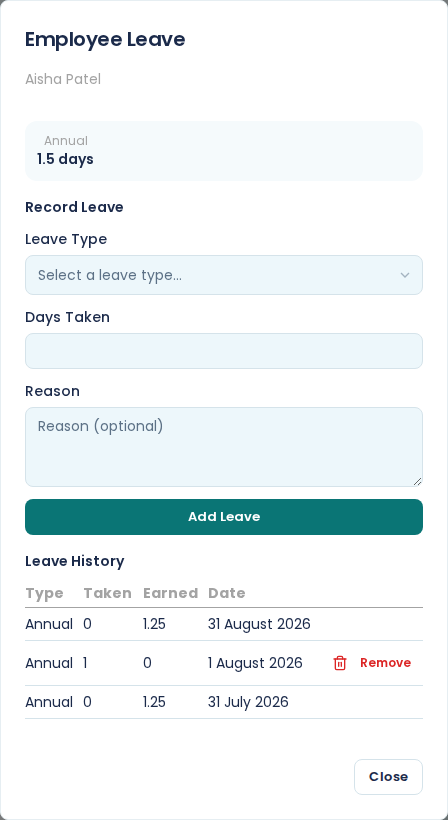
Pick a Leave Type, enter Days Taken, and choose Add Leave. Reason is optional, though it is the only place the story gets recorded, so it is worth a few words.
The leave types
Absenteeism, Annual leave, Family responsibility, Maternity, Other leave, Sick leave, Study leave and Unpaid Leave.
Any of them can be recorded against anyone. What the law entitles someone to is in BCEA leave entitlements.
Reading the balance
E·BIZI Pay keeps a balance for three of those types: annual, sick, and family responsibility. The card at the top of the dialog shows the ones with days on them, so a person with only annual leave built up sees a single Annual figure and nothing else.
Annual leave builds up as the person works. Each month end adds an accrual row to the history, 1.25 days on the default of fifteen days a year, so someone in their second month has 2.5 days rather than a full year's worth.
If a balance looks wrong, the entitlement behind it is the first thing to check. It is Annual leave days on the employee's record, in the Employment section. See employee details explained.
The "days available" line on the payroll row is the same annual figure, so you can see it without opening the dialog.
Leave History
Every row the person has, in one table: Type, Taken, Earned and Date.
Accrual rows show a figure under Earned and nothing under Taken. They are E·BIZI Pay adding up what the person has worked for, and you cannot remove them.
Rows you captured show up under Taken, dated the day you recorded them, with a Remove next to them. Remove puts the days back on the balance.
Recording leave does not change the pay
Capture a day of annual leave and the balance drops. Gross, deductions and net pay stay exactly where they were, because the person is paid their salary either way.
Leave taken in a month shows up as its own column once you confirm the month. See payroll history.