Earnings and deductions
Every employee row adds up to three numbers: gross total, deductions and net pay. This is where the first one comes from and what the second one is made of.
What makes up the gross total
The gross total is the salary you set on the employee, plus anything extra you add for that month. Each part is its own line under the row.

Normal Time - Salary is the monthly salary from the employee's record. To change it permanently, edit the employee. To pay something once, add income instead.
Add income to someone's month
Choose Add income on the person's row, pick a type, enter the amount and choose Add.
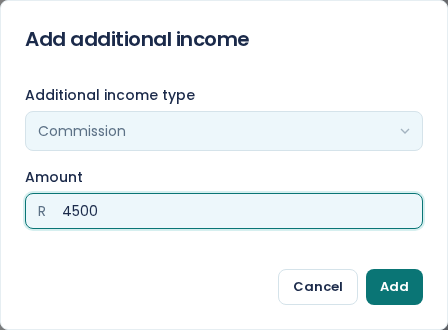
There are eleven types: Entertainment allowance, Overtime, Leave pay, Bonus, Cell phone allowance, Commission, Travelling allowance (taxable), Other income (taxable), Other income (not taxable), Reimbursements, and Salaries and wages.
The type matters for tax, so pick the one that describes the payment rather than the first one that looks close. Reimbursements and Other income (not taxable) are not taxed. The rest are.
A type already on the row drops out of the list, so you cannot add two Bonus lines to the same person in the same month. Edit the existing line instead.
Adding income only works while the month is open. Once you confirm it, the option goes.
Change or remove an income line
Choose the pencil next to the line. Edit additional income lets you change the amount and choose Save, or choose Remove to take the line off entirely.
The salary line has a pencil too, and it opens a different dialog that can change the salary permanently or for this month alone. See change an employee's pay.
What the deductions are
The deductions figure is PAYE plus the employee's UIF. That is all of it, and E·BIZI Pay works both out for you from the gross.
You cannot add your own deduction. There is no field for a loan repayment, a medical aid or a garnishee anywhere in E·BIZI Pay today.
SDL and the company's half of UIF are not deductions. Your employees do not pay them, you do, so they sit under SARS in the totals at the bottom of the payroll rather than in anyone's row. For what each one is, see how PAYE works, UIF explained and SDL explained.
The recalculation is immediate
Add a R5 000 bonus to someone on R31 500 and the row updates as soon as you choose Add: gross goes to R36 500, deductions go from R5 248,12 to R6 776,87, and net pay follows. You do not have to recalculate anything yourself.
The company totals and the SARS totals at the bottom of the screen move with it, which is worth a glance before you confirm the month. See close a payroll period.
Seeing the split
The row gives you the deductions as one figure. The breakdown into PAYE and UIF is on the payslip, which you can open from the row with Download payslip. See view and download payslips.