Reusable fragments
A fragment is a block of content kept in one place and used in many templates: your banking details, a letterhead, a standard set of terms. Change the fragment once and every template that uses it changes with it.
Use one for anything that appears in more than one template and will eventually be wrong. Bank account numbers are the classic case.
Make a fragment
Open Fragments in the sidebar and choose New fragment. Give it a Name, and Papers derives the slug from it.
That opens the fragment in its own editor, which is the template editor with the page-level things removed: no page setup, no page break, no table of contents, because a fragment is a block of content and not a document.
Everything else is there. A fragment can hold variables, a table, an image, a formula, even a repeating section.
Save it
The fragment editor has a Save button and it does not save as you type. Unsaved changes appears next to the button while you have work that is not saved, and leaving the page with it showing prompts you first.
This is the opposite of the template editor, which autosaves your draft. Fragments are shared, so saving one changes documents somewhere else, and that is worth a deliberate button.
Check it against real data
A fragment full of variables is hard to judge on its own, so Test Data in the fragment editor lets you borrow a template's test data: pick the template, then the named test data, and the fragment fills in.
Put a fragment in a template
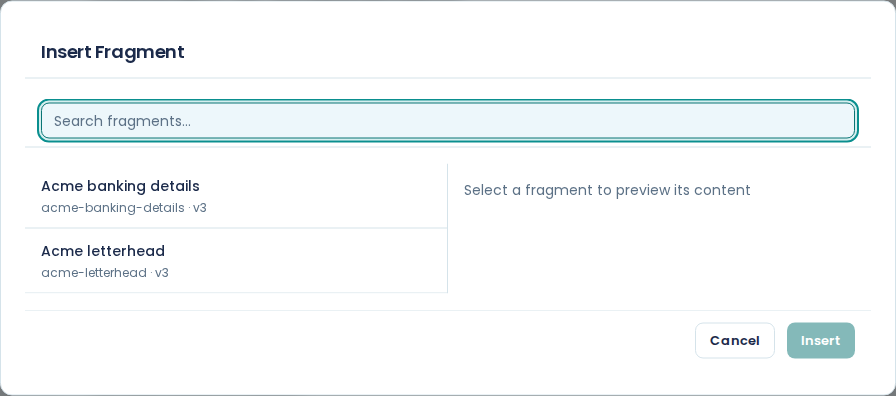
In the template editor, choose Insert fragment from the toolbar. The Insert Fragment
dialog lists your fragments with their slug and version, acme-banking-details · v3, and shows
the content of the one you select. Choose Insert.
The fragment sits in the document as a single block. You cannot edit its content there, which is the point: it has one home, and this is a reference to it.
A fragment in a header or footer
A header or footer region can adopt a fragment instead of holding its own content, which is how a letterhead gets onto every template without being pasted into each one. See headers and footers.
Editing a fragment changes documents you have already published
A published template version records which fragment it points at, not what that fragment said at the time. Edit the fragment and every template using it produces the new content from then on, including versions you published months ago.
That is the behaviour you want for banking details and the behaviour to think twice about for a term that has to match what somebody signed. Versions and publishing covers what publishing does and does not freeze.
Fragments inside fragments
A fragment can reference another one, ten deep. A fragment that ends up referencing itself is refused rather than looped.
Two levels is plenty in practice. A chain of five is a thing nobody will be able to follow in a year.
Deleting one
Each row in Fragments carries a delete button. Choose it and the Delete fragment dialog asks you to confirm, because a deleted fragment cannot be brought back. Choose Confirm.
If a template still uses the fragment, Papers refuses, and the dialog shows "This fragment is used in one or more templates". Take the fragment out of those templates and try again.